
Asset ManagerVaults
Vaults
Field reference for vaults settings and input meaning.
Vaults are Asset Manager capital boundaries. They define asset support, share mode, limits, fees, roles, queues, facility attachments, allocation state, and source-vault boundaries for partner access.
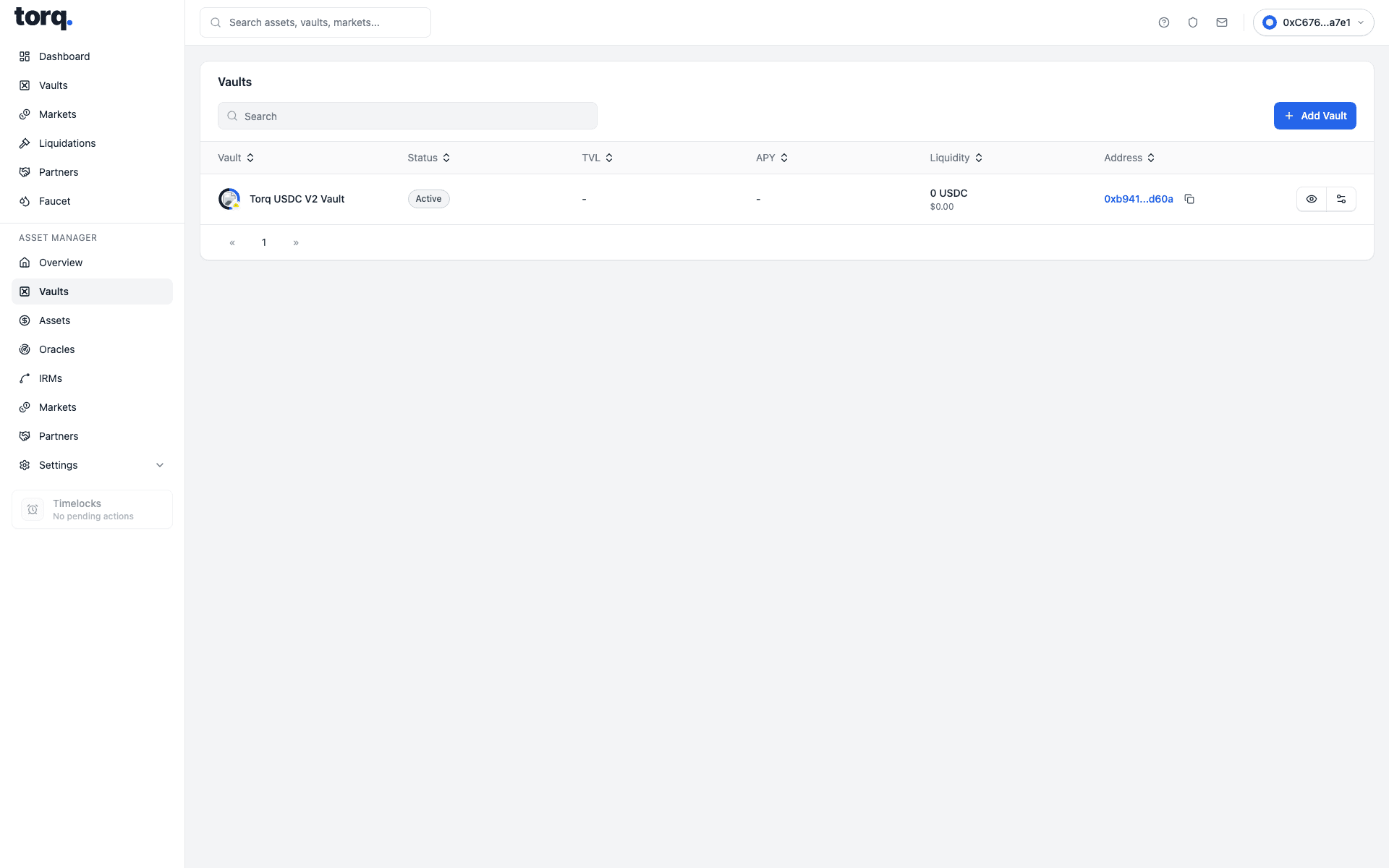
| Visible field | What the user enters or selects | What it is for |
|---|---|---|
Search | Type a vault name, asset symbol, manager, tranche mode, or status. | Filters the vault listing. |
Featured vaults | Click a featured vault card. | Opens a highlighted vault detail page. |
Vault | Click the vault name or row. | Selects the vault to inspect or deposit into. |
Class | No input. Read Single Share, Senior, or Junior. | Shows the share mode exposed by the vault. |
Assets | No input. Read the projected asset amount and USD value. | Shows vault assets from indexed state. |
Coverage | No input. Read debt or coverage state. | Shows whether the vault has active facility exposure. |
Liquidity | No input. Read the visible liquidity amount. | Shows projected cash available for deposits or exits. |
Yield | No input. Read the displayed yield. | Shows projected yield context where available. |
Vault Logo | No direct upload on this form; choose Deposit Asset. | Shows the generated vault logo from the selected asset. |
Vault Name | Enter a vault name. | Sets the vault display name used for deployment. |
Deposit Asset | Select an approved base asset. | Sets vault asset, decimals, icon, and asset-specific defaults. |
Curator | Select a saved curator wallet. | Sets curator authority for the vault. |
Allocator | Select a saved allocator wallet. | Sets allocation authority. |
Guardian | Select a saved guardian wallet. | Sets emergency/guarded-operation authority. |
Fee Recipient | Select the saved fee recipient wallet. | Sets where fee cash/accounting outputs route. |
Fee Mode | Choose BORROWER_MANAGER_SPREAD or DEPOSITOR_PERFORMANCE. | Selects the fee model. |
Manager-Spread (max. 2%) | Enter 0 to 2 percent. | Sets manager spread charged through borrower interest. |
Performance Fee | Enter 0 to 50 percent. | Sets depositor performance fee where enabled. |
Management Fee | Enter 0 to 5 percent. | Sets depositor management fee where enabled. |
Vault Type | Choose Single Share or Senior/Junior Tranche Vault. | Sets whether tranches are deployed. |
Senior Target Yield | Enter 0 to 100 percent when tranching is enabled. | Sets senior tranche target yield. |
Minimum Junior Subordination | Enter 0 to 100 percent when tranching is enabled. | Sets required junior protection. |
Allow tranche token transfers, subject to policy | Toggle transfer policy on or off. | Sets tranche transfer behavior. |
Vault Deposit Cap | Enter maximum total vault deposits, or use the unlimited toggle. | Sets total deposit capacity. |
Per-User Cap | Enter maximum deposits per account, or use the unlimited toggle. | Sets account-level capacity. |
Minimum Deposit | Enter minimum accepted deposit, or enable No Minimum. | Sets minimum deposit threshold. |
Total Tranche Deposit Capacity | Enter total tranche capacity, or use the unlimited toggle. | Caps Senior/Junior tranche deposits. |
User Access | Select the deposit access mode. | Sets whether deposits are open or gated. |
Enable withdrawal rate limit | Toggle withdrawal-duration policy on or off. | Activates or disables withdrawal-duration checks. |
Amount per window | Enter asset amount available per window. | Sets withdrawal amount per policy window. |
Window length seconds | Enter hours, minutes, and seconds. | Sets withdrawal policy window length. |
Policy start Unix seconds | Enter or select policy start time. | Sets when the policy becomes active. |
Policy end Unix seconds | Enter or select policy end time. | Sets when the policy expires. |
Save Changes | Click after reviewing changed settings. | Submits the changed vault settings. |
Cancel | Click without saving. | Discards local edits. |
Select market | Choose the shared market to attach to the vault. | Sets the vault-market relationship. |
Max Capital Envelope | Enter max vault capital for the selected market, or mark unlimited. | Caps total capital this vault can allocate to the facility. |
Max Allocation Increase Per Transaction | Enter max allocation increase per transaction, or mark unlimited. | Limits one-step allocation increases. |
Max Draw Per Transaction | Enter max borrower draw per transaction, or mark unlimited. | Caps one borrower draw from this facility. |
Max Draw Per Window | Enter max borrower draw per window, or mark unlimited. | Caps aggregate draws during a window. |
Draw Window Seconds hrs. | Enter hour component of the draw window. | Sets draw-window duration. |
Draw Window Seconds min. | Enter minute component of the draw window. | Sets draw-window duration. |
Draw Window Seconds sec. | Enter second component of the draw window. | Sets draw-window duration. |
Allocation Target for {market} | Enter target allocation amount for a market row. | Sets desired assets allocated to that market. |
Share Target for {market} | Enter target allocation share from 0 to 100 percent. | Sets desired percentage allocation. |
Allocate | Click a permitted allocation action. | Moves vault capital toward the selected market target. |
Deallocate | Click a permitted deallocation action. | Moves vault capital away from the selected market target. |
AI Allocator Review | Review suggested allocation rows before approval. | Shows AI-assisted route suggestions where surfaced. |
Request {assetSymbol} | Enter a non-negative exit amount in vault-share or asset-equivalent units. | Sets the amount for a redemption or queue request. |
Max | Click to fill the current projected vault position. | Uses the maximum exit amount available from projected holdings. |
Request Redeem | Click after entering an exit amount. | Opens redemption request review. |
Immediate Liquidity | No input. Read available immediate cash. | Shows how much of the request can be fulfilled immediately. |
Available Now | No input. Read immediately available amount. | Shows cash currently available for the exit. |
Queued Remainder | No input. Read amount that must wait. | Shows the part expected to enter the FIFO queue. |
Withdrawal Rate Limit | No input. Read remaining policy capacity. | Shows whether withdrawal-duration policy constrains the request. |
Policy End | No input. Read the policy end timestamp if shown. | Shows when the withdrawal-duration policy expires. |
Queue Mode | No input. Read the queue mode. | Shows whether exits use FIFO or another configured mode. |
Claim | Click a ready claim row. | Settles a projected exit claim. |